The autonomous coding agent that works with any model
Full autonomy — explore, plan, execute, verify — with the freedom to use Claude, Gemini, DeepSeek, or any OpenAI/Anthropic-compatible API. VS Code, desktop, and CLI.
No subscription. Bring your own key.
One agent. Three surfaces.
VS Code extension, standalone desktop app, and CLI. Same engine, same power — choose how you work.
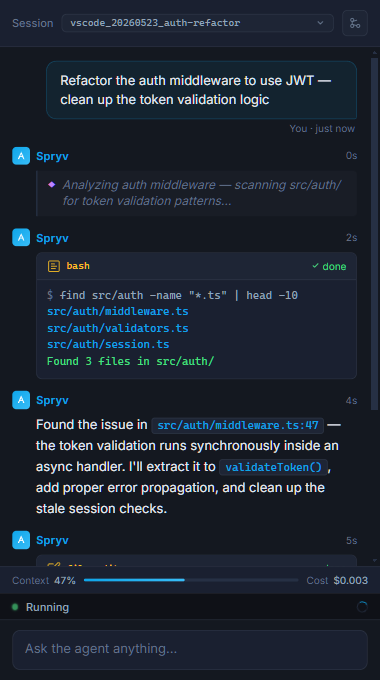
VS Code Extension
Chat panel with live thinking blocks, tool call results, token tracking, and session history — right inside your editor.
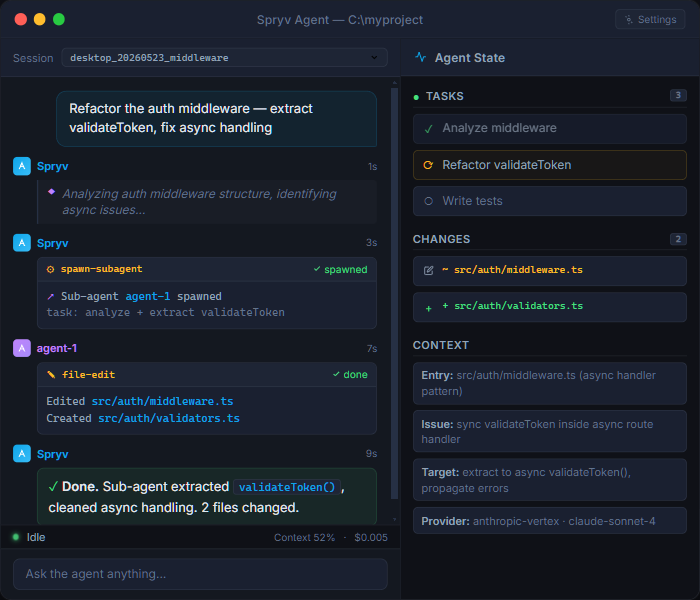
Desktop App
Full two-column layout: chat on the left, live state tree on the right — tasks, changes, confirmed facts, and sub-agent status all visible at once.
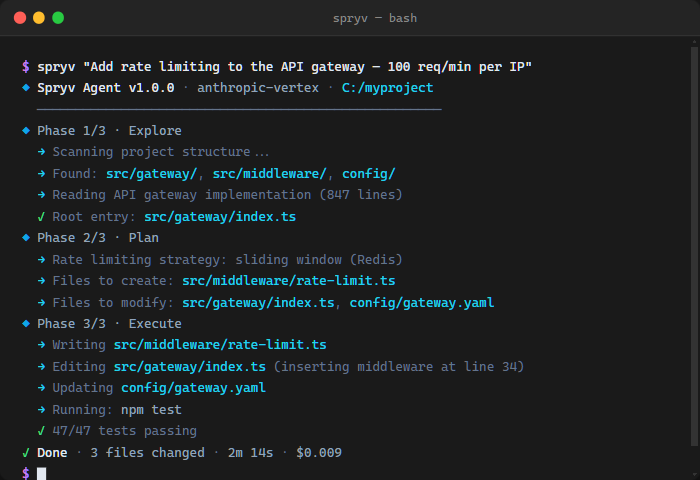
CLI
Phase-gated output in your terminal — Explore, Plan, Execute — with live progress, file paths, and a cost summary at the end.
A complete coding agent — with any model
A complete autonomous agent loop. Not a chat wrapper, not an autocomplete. A system that explores, plans, implements, reviews, and verifies — end to end.
Full Agent Loop
Explore → Plan → Execute → Verify. Reads your codebase, maps the call graph, writes an explicit plan, applies changes through a built-in architect review, runs the tests, reports back.
Any Model — No Lock-In
Works with any OpenAI or Anthropic-compatible API — Claude, Gemini, DeepSeek, Kimi K2, OpenRouter, Vertex AI, or a private self-hosted endpoint. One flag to switch.
Sub-Agent Architecture
Spawn parallel specialized sub-agents, each with its own context and tool set. Define custom agents in a Markdown file — no code required.
Live State Tree
Confirmed facts, pending tasks, file changes, sub-agent status — updated every iteration. A health-check monitor detects loops and stalls and self-corrects.
Custom Skills & MCP
Define /slash-command skills in a Markdown file and invoke them by name in any interface. Connect any MCP server for additional tools.
Persistent Sessions
Every session saved with full conversation, tool log, state snapshots, and cost breakdown. Resume or fork any session exactly where you left off.
Give it a task. Watch it ship.
Spryv runs a structured loop modeled on how a senior engineer actually works — not a single prompt, but a full autonomous process.
-
1
Give it a task
Describe what you want in plain English. Works with whichever model you have a key for — Claude, Gemini, DeepSeek, or any compatible API.
-
2
Explores, plans, and reviews
Reads the relevant files, maps the call graph, and writes an explicit plan before touching anything. Every patch goes through a multi-round architect review before being applied.
-
3
Executes and verifies
Implements the changes, runs the test suite, and reports cost. A health-check monitor detects loops and self-corrects. You get a clean diff and a summary of what changed.
Download & install
Free to use, for individuals and teams. Bring your own API key.
VS Code Extension
v1.2.46Full chat panel with thinking blocks, tool calls, session history, and live state visualization — inside VS Code. Requires VS Code 1.85+.
ext install FaisalSalamah.spryv-vscode
Download .vsix
Windows Desktop
v1.0.0Standalone Electron app with two-column layout: chat panel + live state tree. Runs the standard Windows installer — no manual extraction. Windows 10+.
CLI
v1.2.1Install globally and run from any directory. Phase-gated output, same underlying agent, zero UI overhead. Requires Node 18+.
--providerto switch between Claude, Gemini, DeepSeek--resumeto continue any previous session--chatfor interactive multi-turn mode
Everything you need to get started
From first install to defining custom agents and skills.
Installation
↗Setup for VS Code, CLI, and desktop app. Requirements and first-run walkthrough.
Configuration
↗API keys, provider setup, and model selection for Claude, Gemini, DeepSeek, Kimi, and OpenRouter.
Sub-Agents
↗Built-in agents (explore, planner, pr-review) and how to define custom agents in Markdown.
Skills
↗Built-in slash commands (/commit, /explain) and how to define custom skills in Markdown.
Releases
↗Download the VS Code extension (.vsix), CLI tarball, and Windows desktop app for every release.
Support & Feedback
↓Report bugs, request features, or ask questions by email. We read everything.
Get in touch
Questions, feedback, or partnership inquiries — we read everything.
[email protected]Bug reports and feature requests go to the same address.